
With a friend
Send a private share link when one person needs your library: a colleague who takes the same EU legal jobs, a student you supervise, or a reviser who should use the same ChatGPT buttons as you.
They open the link, click Download, then import the file in Wordscope. The library stays private: only people who have the link can get it, unless you later list it on Wordscope Public Prompt Libraries page.
To share a library with a friend:
1️⃣ Open a project.
2️⃣ Click the ChatGPT button.
3️⃣ Click the Libraries button.
4️⃣ Select a library you own.
5️⃣ Click Share.
6️⃣ Click Copy on the Share URL.
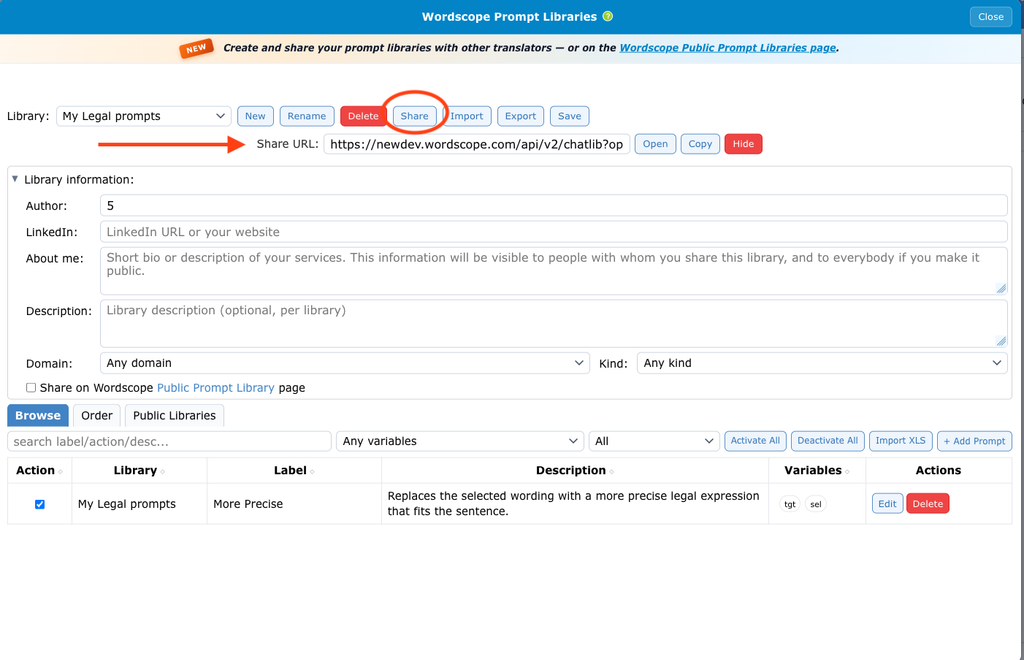
Copy the share link and send it to a colleague
7️⃣ Send the link to your friend by email or chat.
If Share is greyed out, you are looking at an imported library or a Wordscope built-in pack. Only the owner can share.
Wordscope is an all-in-one CAT tool, working seamlessly on both Mac and PC, that combines multiple machine translation engines, over a dozen specialized terminology tools, and the robust assistance of ChatGPT for Translators. It provides professional translators with advanced functionalities for translation, definition, rewriting, and much more.
Try now! Log in or sign up to receive a free trial subscription!
Visit pro.wordscope.comTrusted by thousands of professional translators in 40+ countries
Visit pro.wordscope.com to create a translation project.