
Usage
The Usage tab and the roster show how many words each student has used in the current period, and which licences are active.
Usage tab
As the subscription owner, the Usage tab gives you:
1. Your personal usage
The same summary students see for themselves:
- current usage period;
- words used / included words / remaining;
- progress bar for AI assistance consumption.
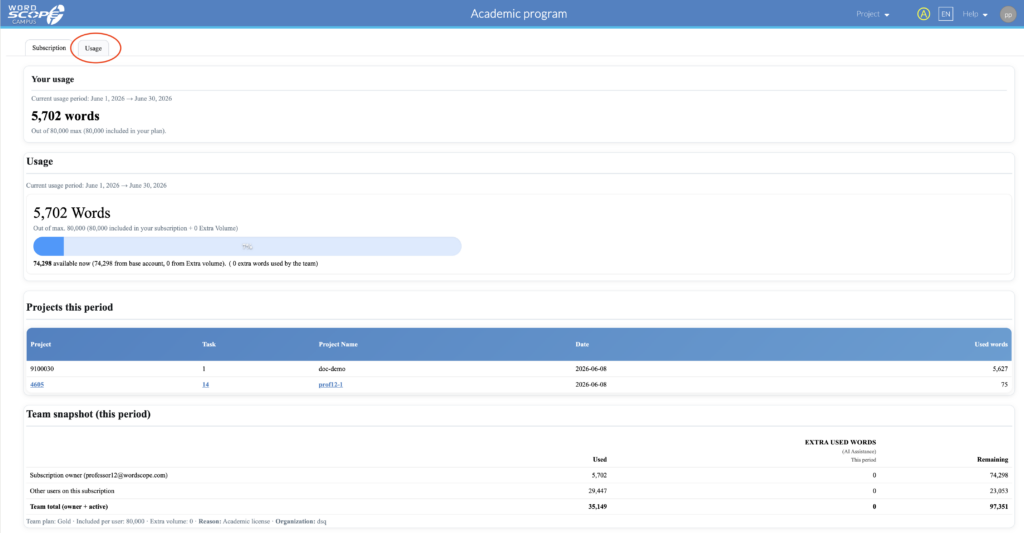
2. Team snapshot (this period)
If you have students on your roster, a Team snapshot table summarizes:
| Row | What it shows |
|---|---|
| Subscription owner (you) | Your own words used, extra used (if any), remaining. |
| Other users on this subscription | Combined usage of active students on your roster. |
| Team total | Overall consumption for the class licence this period. |
Use this for a quick class-wide picture without opening each student row.
3. Projects this period
Your own project-level breakdown (same table as for students), useful if you also translate or demo in the tool.
Per-student usage on the roster table
For day-to-day teaching, the roster table is the main place to monitor each student individually.
Open the Universities segment (or the subscription area where you manage your class list). The roster lists every invited student with columns such as:
| Column | Purpose |
|---|---|
| Student address on the roster. | |
| Status | e.g. active, waiting for validation, removed. |
| Subscription | Licence tier assigned to that seat (e.g. academic Silver/Gold). |
| Included words (AI Assistance) | Monthly word allowance for that seat. |
| Max words/month | Cap configured for your academic program (when shown). |
| Total used words (this period) | How many words that student has consumed this month. |
| Remaining included words | How much of their allowance is left. |
So you do not need to ask students to report usage manually: refresh the subscriptions page and read their numbers directly in the roster.
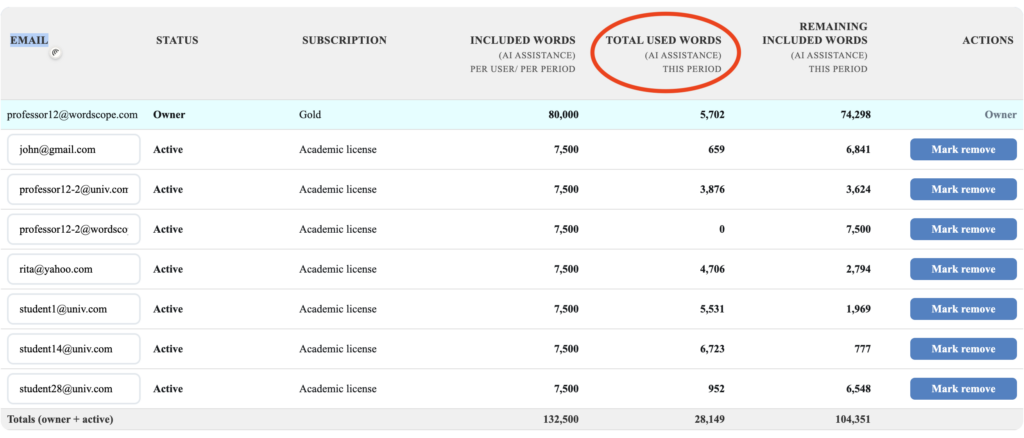
Roster table with word columns visible for several students
Typical workflow
- After assigning a large MT/AI exercise, check Total used words per student.
- Identify students near Remaining included words = 0 before a deadline.
- Use roster Status to confirm everyone is active (invitation accepted).
- Contact academic@wordscope.com if your institution needs more seats or a higher default monthly cap.
Usage tab vs roster — when to use which
| Need | Where to look |
|---|---|
| One student’s exact consumption | Roster → Total used words / Remaining for that row |
| Whole class total this month | Usage tab → Team snapshot |
| Your own usage as professor | Usage tab → personal summary |
| Which project used words (one user) | Usage tab → Projects this period (owner or student view) |
Roster colours (legend on screen):
| Colour / status | Meaning |
|---|---|
| Normal | Current active member |
| Green | Newly added (pending activation / waiting validation) |
| Red | Marked for removal |
| Yellow | Email updated but not yet saved |
You may add or remove students during the term by updating the roster and saving again.
.
Your subscription vs your students’ licences
| Professor (programme owner) | Students (roster seats) | |
|---|---|---|
| Plan | Gold — free, for teaching use | Education licence — same Gold-level features for coursework |
| Word volume | Unlimited (no monthly word cap on the owner account) | Limited to 7,500 words per month (default academic cap) |
| Other typical limits | — | Up to 2,500 words per project and 10 projects per month (defaults; your institution’s approval may specify slightly different caps) |
| Cost | Free under the Academic Program | Free while on your approved roster |
Your students will use the same translation interface and AI-assisted tools as you; the main difference is usage quotas, which are appropriate for classroom volume.
Wordscope is an all-in-one CAT tool, working seamlessly on both Mac and PC, that combines multiple machine translation engines, over a dozen specialized terminology tools, and the robust assistance of ChatGPT for Translators. It provides professional translators with advanced functionalities for translation, definition, rewriting, and much more.
Try now! Log in or sign up to receive a free trial subscription!
Visit pro.wordscope.comTrusted by thousands of professional translators in 40+ countries
Visit pro.wordscope.com to create a translation project.