
What is a prompt
A prompt is the instruction you give to ChatGPT. It can be a simple instruction, for example, “Translate into French”, or it can contain variables, for example, “Give me the definition of {%selected_text}”.
If you do not specify any variable, Wordscope still sends some context to ChatGPT, including the source and target languages and the source segment, and then tries to carry out your instruction.
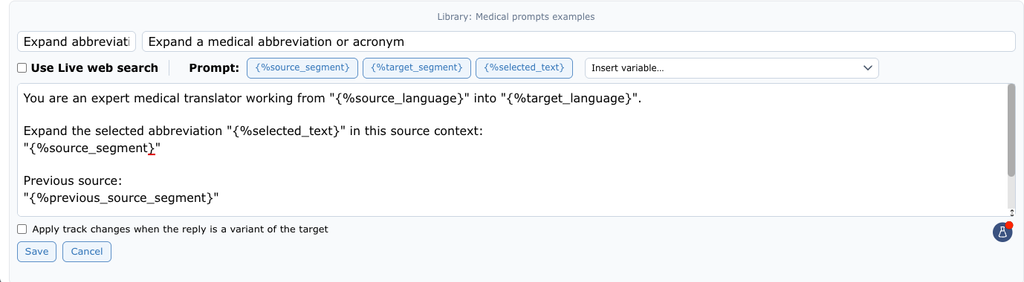
A prompt is a reusable instruction, saved in a library.
If you use variables, Wordscope adapts them automatically to the current context before sending the prompt to ChatGPT. For example, {%selected_text} is replaced by the text currently selected in the source or target segment, while {%source_segment} is replaced by the current source segment.
This saves you from having to copy and paste content manually.
If you often make similar requests, it is worth creating a custom prompt, saving it in a library, and turning it into a button. When you click the button, Wordscope automatically fills in the current segment and any variables, so you do not have to retype the instruction for each segment.
To discover how to create a prompt or get a full list of variables, see Create a prompt.
Wordscope is an all-in-one CAT tool, working seamlessly on both Mac and PC, that combines multiple machine translation engines, over a dozen specialized terminology tools, and the robust assistance of ChatGPT for Translators. It provides professional translators with advanced functionalities for translation, definition, rewriting, and much more.
Try now! Log in or sign up to receive a free trial subscription!
Visit pro.wordscope.comTrusted by thousands of professional translators in 40+ countries
Visit pro.wordscope.com to create a translation project.