
Wordscope spell & grammar checker
By default, the option Wordscope spell checker and grammar is selected. Wordscope Quality runs on the target text and displays the toolbar on the current segment’s target area. Issues are underlined in the text; you click an underlined zone to see correction suggestions.
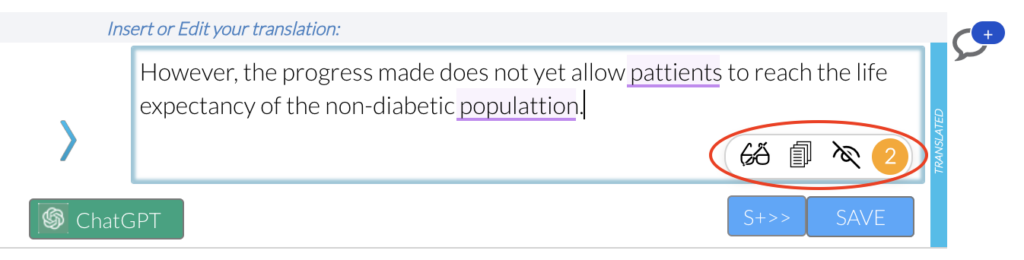
Automatic checking is on by default. You can turn it off or on again from the toolbar without leaving the editor.
The Wordscope Quality toolbar
The floating toolbar appears on the target editor of the open segment. Its controls are:
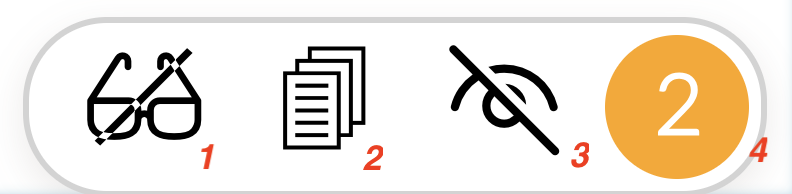
| Control | What it does |
|---|---|
| 1. Disable / Enable automatic quality control | Turns Wordscope’s automatic spell and grammar checking off or on for your session. When automatic control is disabled, the main button can still run a manual check on the current text. |
| 2. Personal dictionary and Ignore lists | Opens your personal dictionary and ignore lists so you can review words you have added or always ignored for the project. |
| 3. Hide / Show detected problems | Hides or shows the underlining of detected problems in the target, without removing the suggestions themselves. |
| 4/ Main status / check button | Shows the check status: for example no problem found, or a number of problems. Click it to check the current text (especially useful if automatic quality control is disabled). Tooltip guidance also points you to click underlined zones for correction suggestions. |
When a problem is highlighted
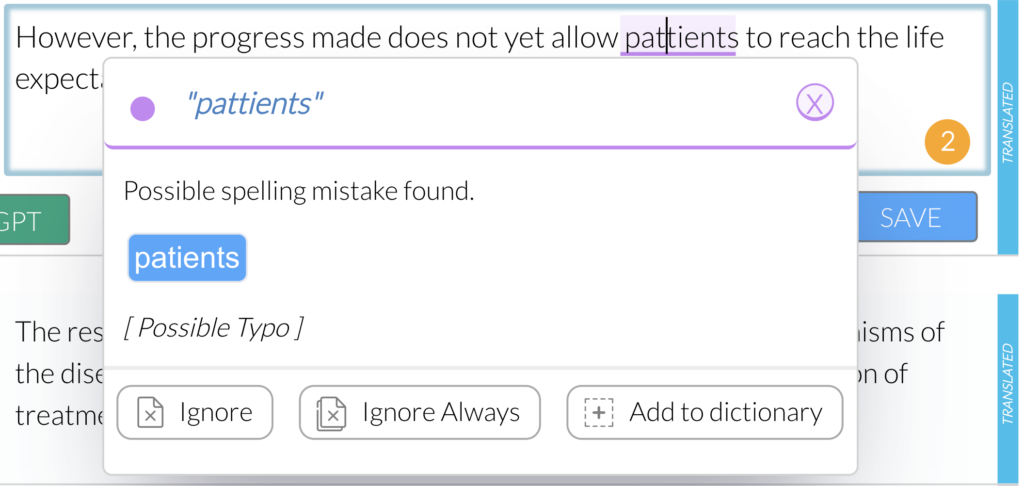
Click an underlined word or zone in the target. A suggestion popover opens with the proposed correction and actions such as:
- Ignore — ignore this correction for the current segment only.
- Ignore Always — always ignore this correction during the current project (requires login).
- Add word to your personal dictionary — treat the word as valid in future checks (requires login).
Language availability: Wordscope Quality covers many project languages. If it is not available for the current language pair, Settings may show that Wordscope Quality is not available for this project language. You can still choose None, or use Antidote when the pair is English↔French.
Wordscope is an all-in-one CAT tool, working seamlessly on both Mac and PC, that combines multiple machine translation engines, over a dozen specialized terminology tools, and the robust assistance of ChatGPT for Translators. It provides professional translators with advanced functionalities for translation, definition, rewriting, and much more.
Try now! Log in or sign up to receive a free trial subscription!
Visit pro.wordscope.comTrusted by thousands of professional translators in 40+ countries
Visit pro.wordscope.com to create a translation project.