
Deleting a Translation Memory
If you no longer need a Translation Memory (TM), you can permanently remove it from Wordscope in just a few steps.
Steps to delete a Translation Memory
1️⃣ Open Settings
2️⃣ Locate the Translation Memory you want to delete
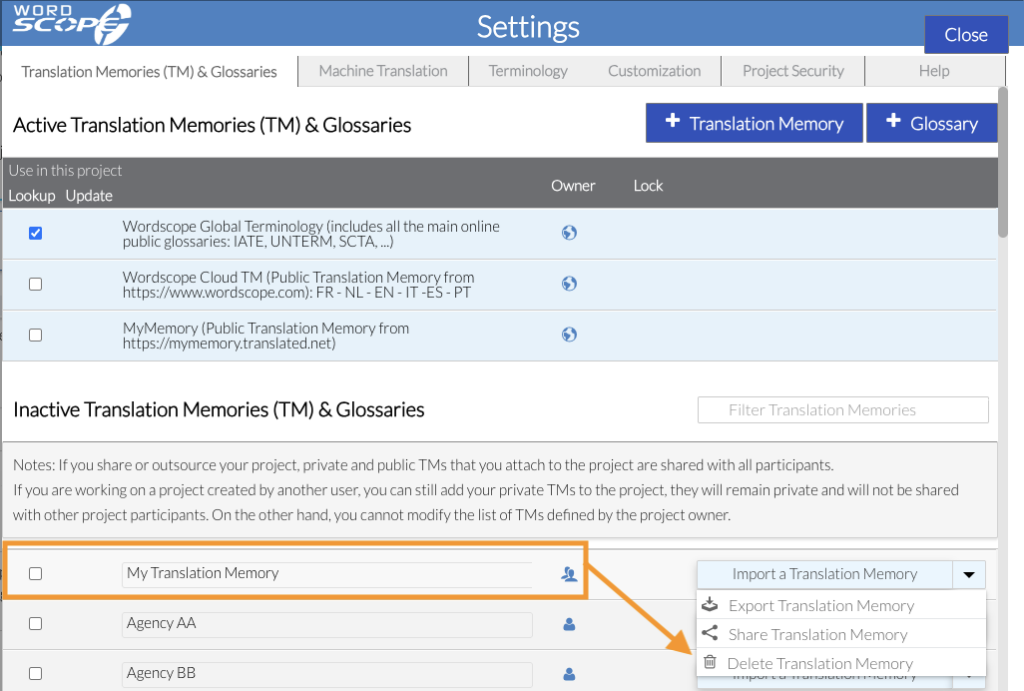
3️⃣ Click the menu on the same line and select Delete Translation Memory
4️⃣ Click Confirm

⚠️ Warning
Deleting a Translation Memory is permanent and cannot be undone. Make sure you no longer need it before proceeding.
If you want to keep a copy, you can export the Translation Memory beforehand by selecting Export Translation Memory from the same menu. This will save a TMX file to your computer for future use or backup.
Wordscope is an all-in-one CAT tool, working seamlessly on both Mac and PC, that combines multiple machine translation engines, over a dozen specialized terminology tools, and the robust assistance of ChatGPT for Translators. It provides professional translators with advanced functionalities for translation, definition, rewriting, and much more.
Try now! Log in or sign up to receive a free trial subscription!
Visit pro.wordscope.comTrusted by thousands of professional translators in 40+ countries
Visit pro.wordscope.com to create a translation project.