
Create a prompt
After you have a library, add the instructions you actually repeat. A prompt is that instruction, saved once, then available as a button when you tick Action.
Typical examples: expand a medical abbreviation, look up an EU Directive mentioned in the segment, rewrite the target in the client’s voice, or list term equivalents for a selected word. You can type a simple instruction, or insert variables so Wordscope fills in the current segment, the selection, and the languages.
Add prompts one by one here, or import many from Excel (see An Excel file with prompts).
Note: You must create a library before you can create a prompt.
To create a prompt:
1️⃣ Open a project.
2️⃣ Click the ChatGPT button.
3️⃣ Click the Libraries button.
4️⃣ Select your library (“My legal prompts” for example).
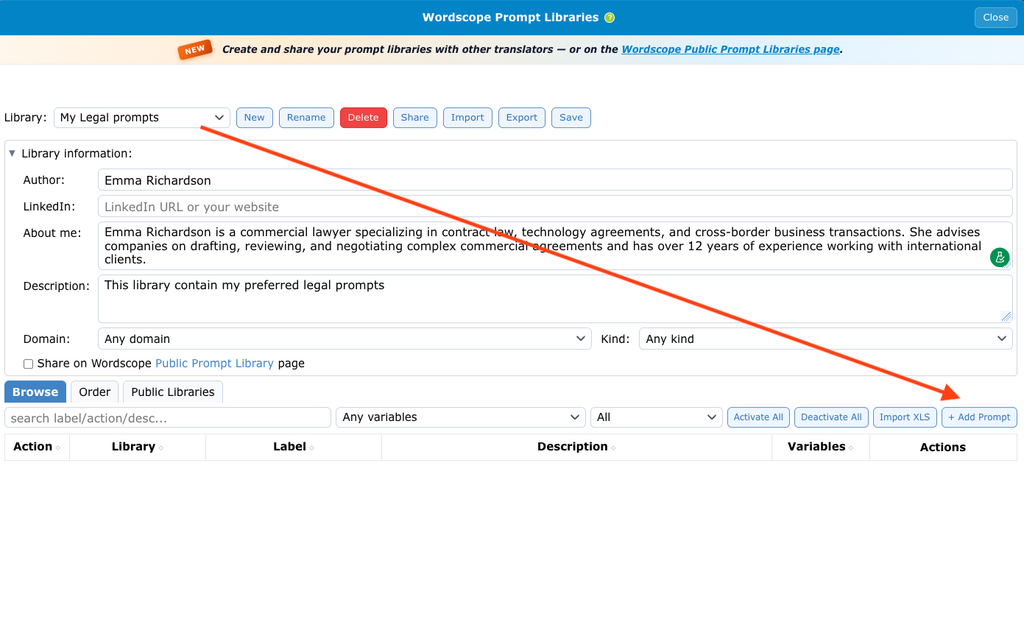
5️⃣ Open the Browse tab.
6️⃣ Click + Add Prompt.
7️⃣ Fill in the fields
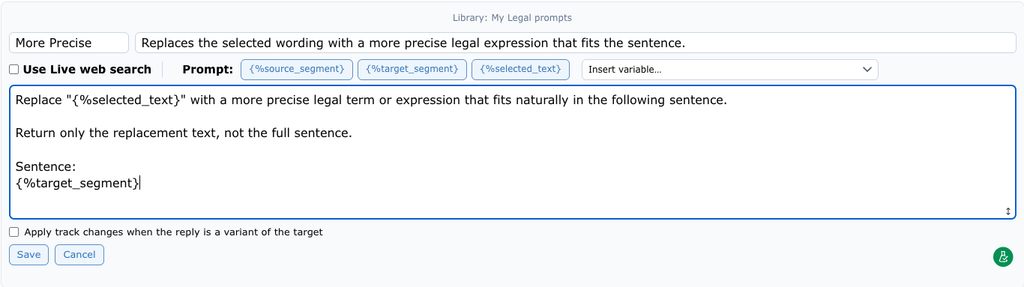
8️⃣ Click Save on the prompt form.
9️⃣ Click Save again on the Libraries toolbar.
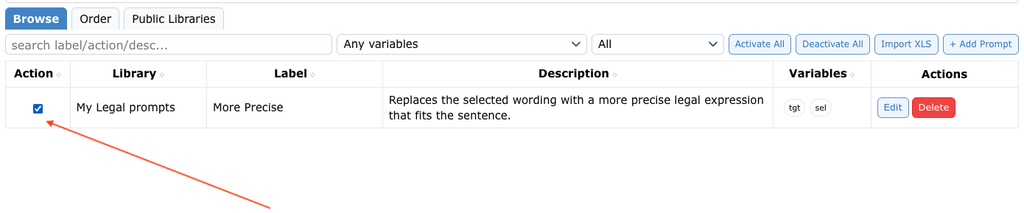
🔟 Tick Action if you want this prompt as a ChatGPT button.
Close the Library window and you will see that your custom prompt is now assigned to an action button
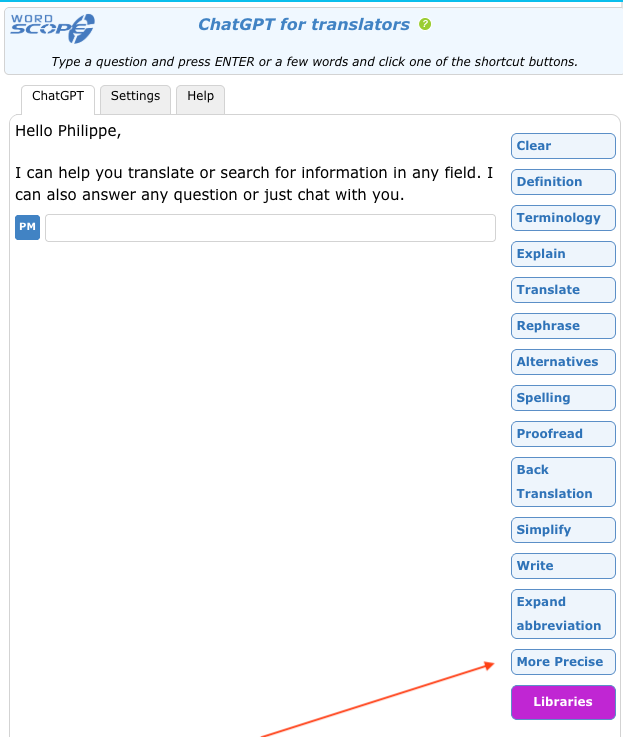
Custom prompt assigned to an Action button
Select your library in the list before you click + Add Prompt. If “All” is selected, you cannot add a prompt.
Fields when you create a prompt
| Field | What it is | What to write |
|---|---|---|
| Label | Short name on the action button | Example: Client tone, Improve fluency |
| Description | Longer note for you (and for people who import your library) | What the prompt does. This is not the main text sent to ChatGPT |
| Use Live web search | Optional. Lets ChatGPT look up live information on the web | Tick only if you need up-to-date external info (laws, drug names…) |
| Prompt | The full instruction for ChatGPT | Clear task + variables. Use the variable buttons or Insert variable… |
| Apply track changes when the reply is a variant of the target | Optional. Shows differences when ChatGPT rewrites the target | Useful for “improve / shorten / fix grammar”. Leave off for explanations or term lists |
Track changes is for rewrite prompts. Leave it off when ChatGPT should explain a term or list equivalents.
⚠️ Live web search – use with caution. Normal ChatGPT for Translators requests (using the model’s knowledge) are unlimited in everyday use. Live web search is different: each search is expensive. Wordscope pays that cost for you, but using Live web search when it is not needed may be limited (period allowance). Use it for research-style prompts only – not for everyday rewrite or proofread buttons.
Variables inside prompts
A variable is a placeholder. Wordscope replaces it with real text from your project when you click the button.
Prefer the variable buttons or Insert variable… instead of typing the code by hand. Wordscope often inserts them in quotes, like {%source_segment}.
| Variable | What Wordscope inserts | When to use it |
|---|---|---|
| {%source_segment} | Current source segment | Explain, check meaning |
| {%target_segment} | Current target segment | Improve fluency, fix grammar |
| {%selected_text} | Text you selected in the editor | Term definition (select the word first) |
| {%source_language} | Project source language | Language pair |
| {%target_language} | Project target language | Language pair |
| {%previous_source_segment} | Previous source | Context / consistency |
| {%previous_target_segment} | Previous target | Terminology consistency |
| {%next_source_segment} | Next source | Register / continuity |
| {%next_target_segment} | Next target | Continuity with what follows |
For a term-level prompt, select the word in the segment before you click the button. That selection becomes {%selected_text}.
Example – improve the target
You are an expert translator working from "{%source_language}" into "{%target_language}".

Source:
"{%source_segment}"

Current target:
"{%target_segment}"

Rewrite the target as natural "{%target_language}". Keep meaning, names, numbers and tone.
Return only the rewritten target.
To insert variables into your prompts, you can also click the buttons or select one from the dropdown list.
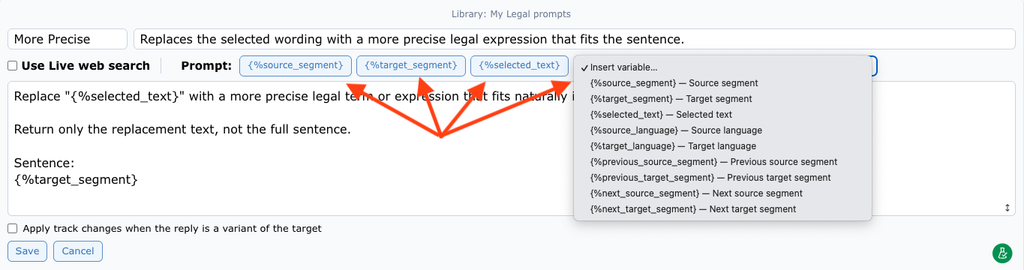
Keep prompt labels as short as possible. Long labels may wrap onto several lines and take up too much space in the ChatGPT window.
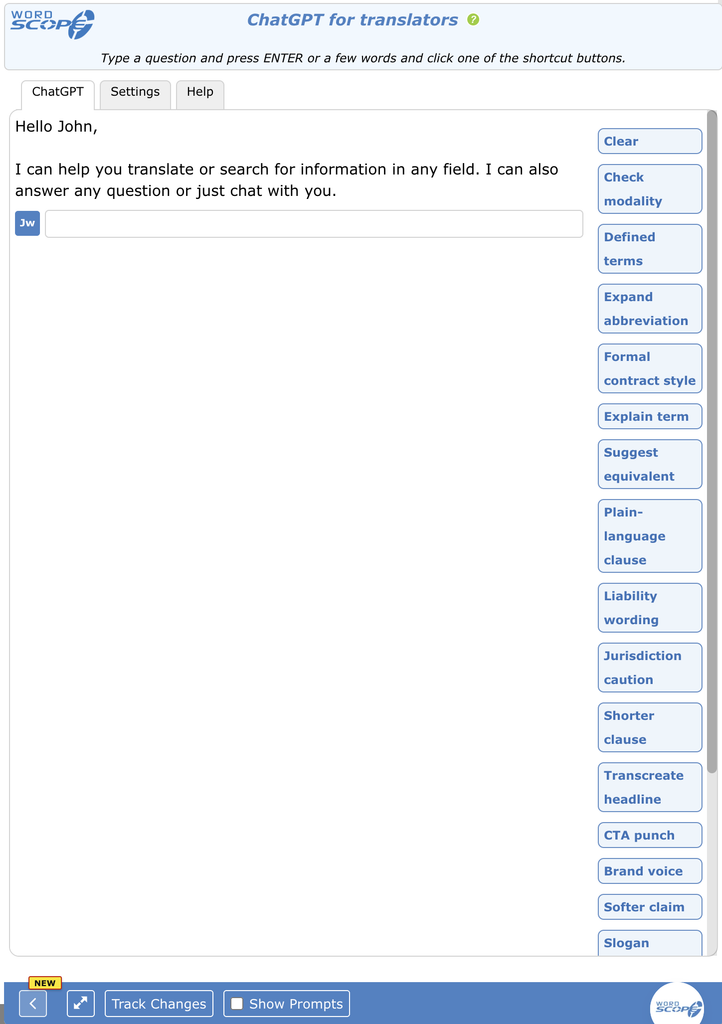
Avoid long labels and activating too many prompts
Wordscope is an all-in-one CAT tool, working seamlessly on both Mac and PC, that combines multiple machine translation engines, over a dozen specialized terminology tools, and the robust assistance of ChatGPT for Translators. It provides professional translators with advanced functionalities for translation, definition, rewriting, and much more.
Try now! Log in or sign up to receive a free trial subscription!
Visit pro.wordscope.comTrusted by thousands of professional translators in 40+ countries
Visit pro.wordscope.com to create a translation project.