
Cosnautas medical dictionaries
Cosnautas is the reference for Spanish medical and pharmaceutical dictionaries, the resources medical translators rely on when precision matters (including the Libro Rojo and related Cosnautas titles).
Those dictionaries are fully integrated into Wordscope: while you translate, Cosnautas terms can be highlighted in the source, opened in one click, and listed in the glossary panel, without leaving the editor.
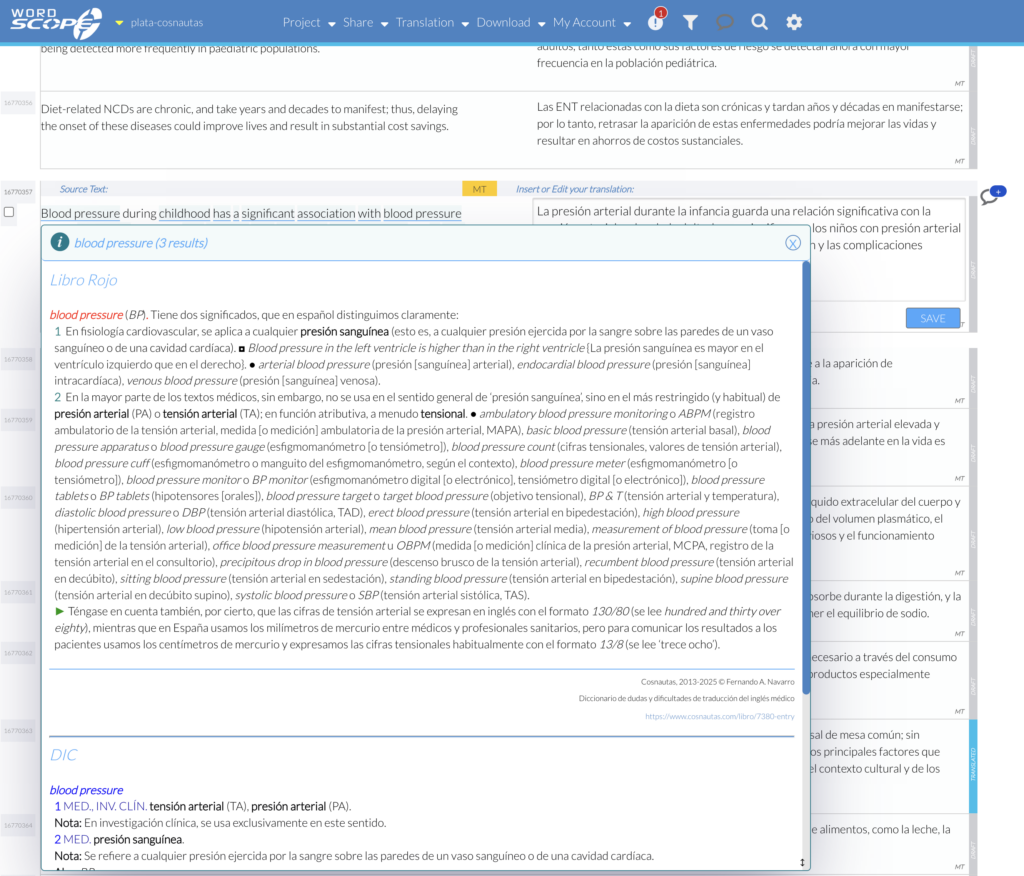
Cosnautas terms are automatically highlighted when you open a segment.
The integration combines Wordscope’s productivity (MT, AI assistance, CAT workflow) with Cosnautas’s specialist medical terminology, so you stay in control of high-stakes EN→ES medical content.
For Cosnautas’s own announcement and walkthrough, see: Finally, Wordscope and Cosnautas are integrated!
Requirements
To use Cosnautas inside Wordscope, all of the following must be true:
1️⃣ You must have a “Cosnautas Wordscope” subscription on Cosnautas (the plan that includes access to Cosnautas in Wordscope). See plans and pricing: https://www.cosnautas.com/fr/precios.
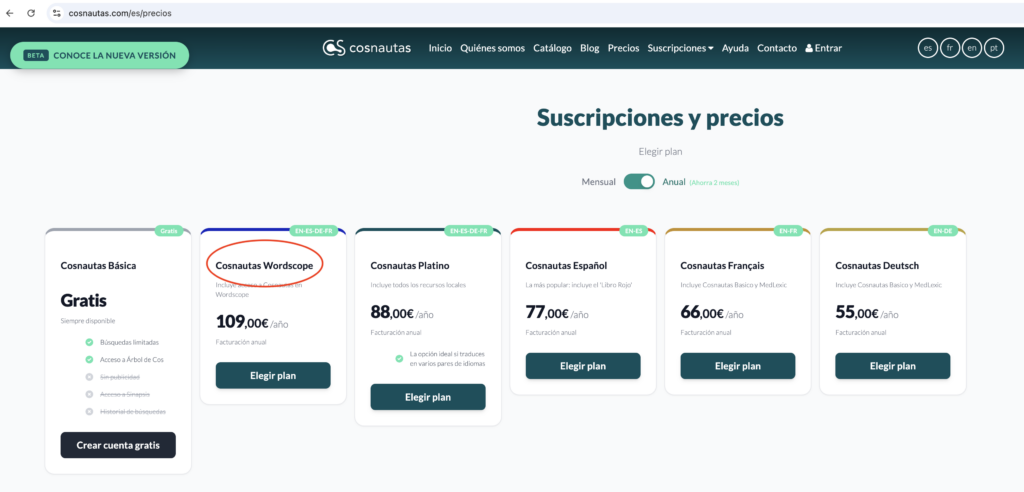
2️⃣ Your Cosnautas account and your Wordscope account must use the same email address. That is how Wordscope checks whether it can offer you Cosnautas access.
3️⃣ Your Wordscope project must be English → Spanish (EN→ES). Otherwise Cosnautas dictionaries do not appear in Settings at all.
4️⃣ You also need an active Wordscope subscription (create or manage it at https://pro.wordscope.com). Cosnautas Wordscope unlocks the dictionaries in Wordscope; it does not replace a Wordscope plan.
- Same email: If Cosnautas and Wordscope are registered under different addresses, Wordscope cannot match your Cosnautas entitlement. Use one email for both accounts.
- Warning: Cosnautas dictionaries will not be listed in Settings (Terminology) if your project is not English → Spanish (EN–ES). Create or open an EN→ES project to see and enable the Cosnautas resources.
Cosnautas dictionaries available in Wordscope
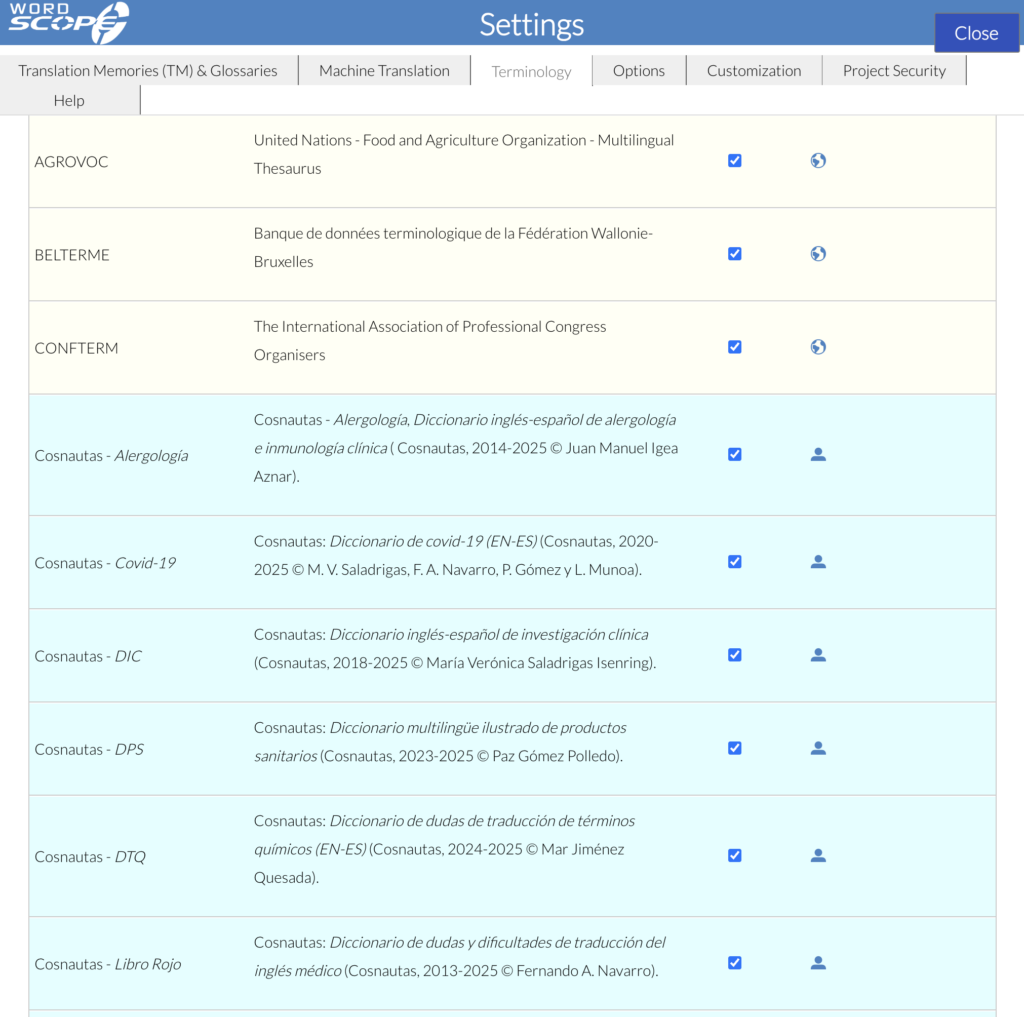
For English → Spanish projects, the Cosnautas resources included in the Wordscope integration include (among others):
- Libro Rojo — Diccionario de dudas y dificultades de traducción del inglés médico (Fernando A. Navarro González)
- Alergología, inmunología — Allergy and clinical immunology dictionary (Juan Manuel Igea Aznar)
- DIC — Clinical research dictionary (María Verónica Saladrigas Isenring)
- DPS — Illustrated multilingual dictionary of medical devices (Paz Gómez Polledo)
- DTQ — Dictionary of doubts for chemical terms EN–ES (Mar Jiménez Quesada)
- Covid-19 — COVID-19 dictionary EN–ES
- SME — Repertoire of medical abbreviations and symbols in Spanish (Fernando A. Navarro González)
Exact titles and editions are maintained by Cosnautas; see their integration article and catalogue for the full list.
How to use Cosnautas in Wordscope
1️⃣ Make sure you have an active Cosnautas Wordscope subscription and a Wordscope account with the same email.
2️⃣ Create or open a translation project with language pair English → Spanish.
3️⃣ Open Settings (the project Settings gear) and go to the Terminology tab.
4️⃣ Select the Cosnautas dictionaries you want to activate for the project.
5️⃣ In the Source column of your project, terms found in the selected Cosnautas resources appear underlined in blue. Click a term to open the Cosnautas entry (definition / translation guidance) without leaving Wordscope.
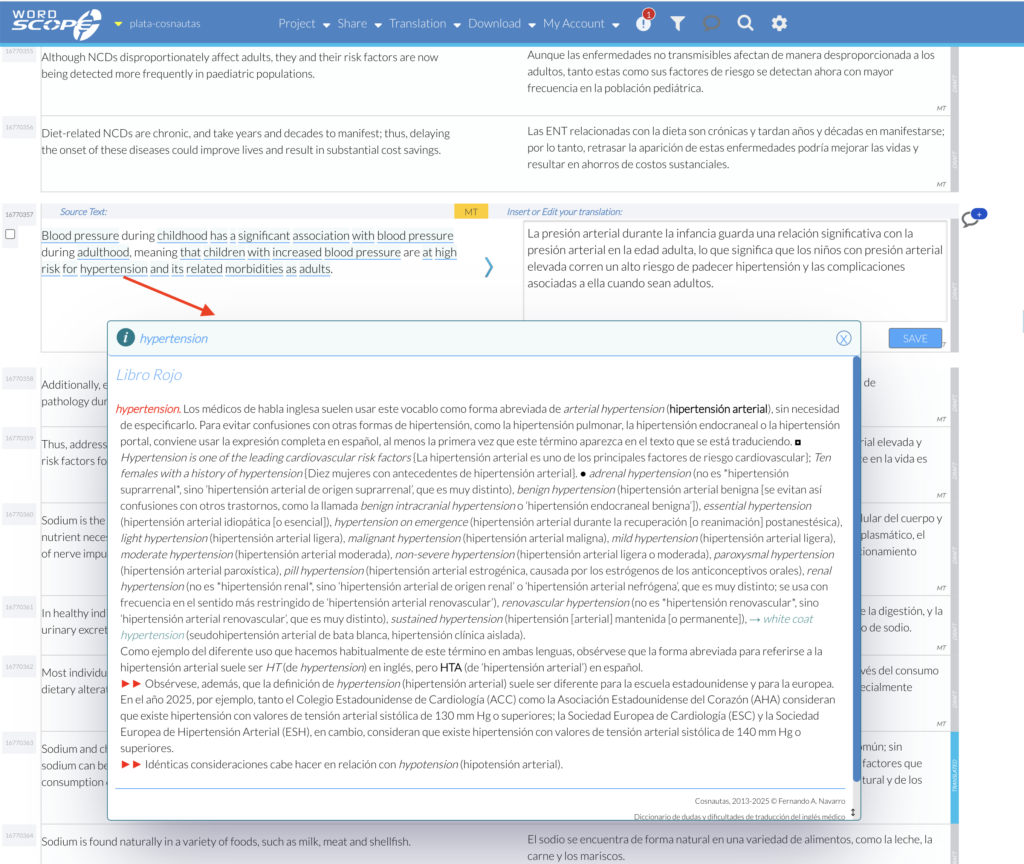
Clicking on an underlined term will pop up a window displaying the full Cosnautas definition and translation of the term.
6️⃣ Matched terms are also listed in the glossary tab on the right, so you can review Cosnautas hits for the current segment while you work.
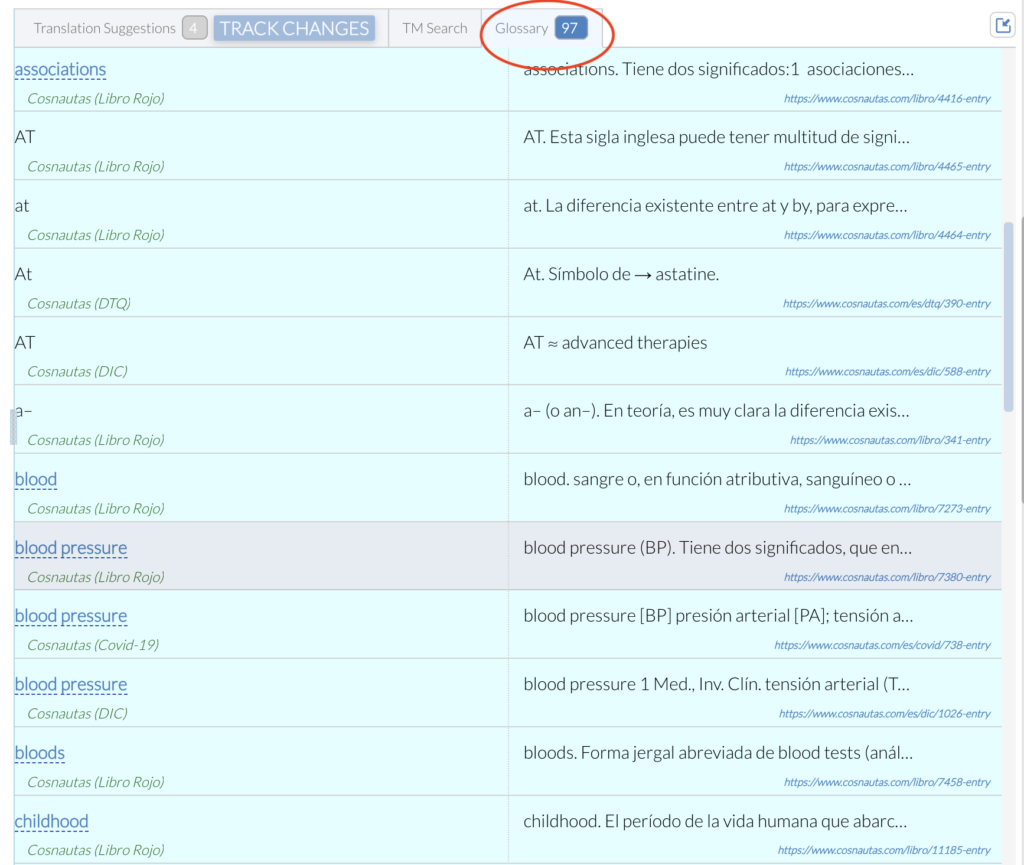
7️⃣ Use those Cosnautas lookups to refine MT and AI proposals and keep medical wording accurate.
If Cosnautas options are locked or show a warning: Settings may indicate that a Cosnautas subscription is required. Confirm you are on Cosnautas Wordscope, that both accounts share the same email, and that the project is EN→ES. More information: https://www.cosnautas.com.
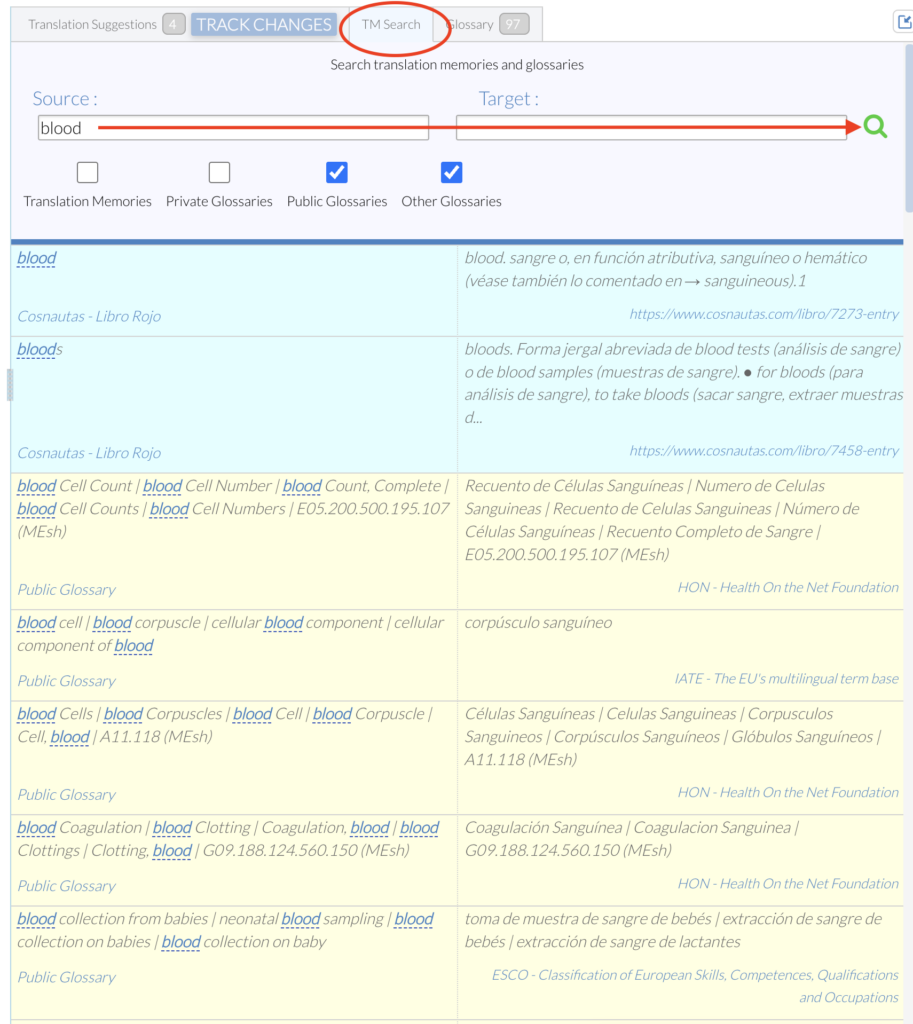
You can also use the TM Search tab to perform a manual search in the Cosnautas dictionaries. Simply type a term in the source or target field and click the magnifying glass icon.
Quick checklist
| Check | Detail |
|---|---|
| Cosnautas plan | Cosnautas Wordscope subscription |
| Wordscope plan | Active Wordscope subscription at https://pro.wordscope.com/subscriptions |
| Identical email address on Cosnautas and Wordscope | |
| Project languages | English → Spanish |
| In the editor | Settings → Terminology → enable Cosnautas resources → click underlined source terms |
Tips
1️⃣ Enable only the Cosnautas dictionaries you need for the job so the source highlighting stays relevant.
2️⃣ Click underlined source terms for the full Cosnautas entry; use the right-hand glossary panel for a quick list of hits in the segment.
3️⃣ Cosnautas is especially valuable on medical and pharmaceutical EN→ES work where generic MT alone is not enough.
Learn more on Cosnautas: www.cosnautas.com · Pricing: precios · Integration guide: Wordscope & Cosnautas integration.
Wordscope is an all-in-one CAT tool, working seamlessly on both Mac and PC, that combines multiple machine translation engines, over a dozen specialized terminology tools, and the robust assistance of ChatGPT for Translators. It provides professional translators with advanced functionalities for translation, definition, rewriting, and much more.
Try now! Log in or sign up to receive a free trial subscription!
Visit pro.wordscope.comTrusted by thousands of professional translators in 40+ countries
Visit pro.wordscope.com to create a translation project.