
Order buttons
After you choose which prompts appear as action buttons, you can change the order of those buttons on the ChatGPT bar. Put the actions you click most often first (after Clear, which always stays at the start).
This example uses only prompts from the Default Library (the built-in Wordscope buttons such as Definition, Explain, Proofread, Terminology).
Example: put Terminology next to Definition
You often look up terms. You want Definition and Terminology side by side, near the start of the button row, before Proofread or Rephrase.
To change the order of action buttons:
1️⃣ Open a project.
2️⃣ Click the ChatGPT button.
3️⃣ Click the Libraries button.
4️⃣ In the Library: list, select Default Library.
5️⃣ Open the Browse tab and check that Definition and Terminology have Action ticked. If not, tick them and click Save.
6️⃣ Open the Order tab.
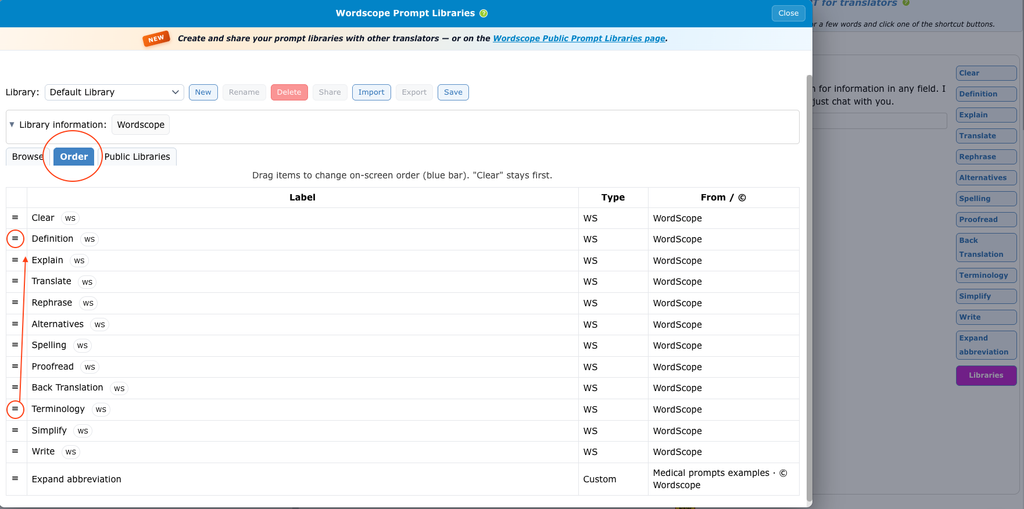
7️⃣ Use the ☰ icon at the left of Definition to drag and drop this prompt near the top of the list.
8️⃣ Use the ☰ icon at the left of Terminology to drag and drop this prompt directly under Definition.
9️⃣ Drag other Default Library buttons (for example Proofread or Rephrase) further down if you use them less often.
🔟 Close Libraries. On the ChatGPT bar, Clear stays first, then Definition, then Terminology, then the rest.
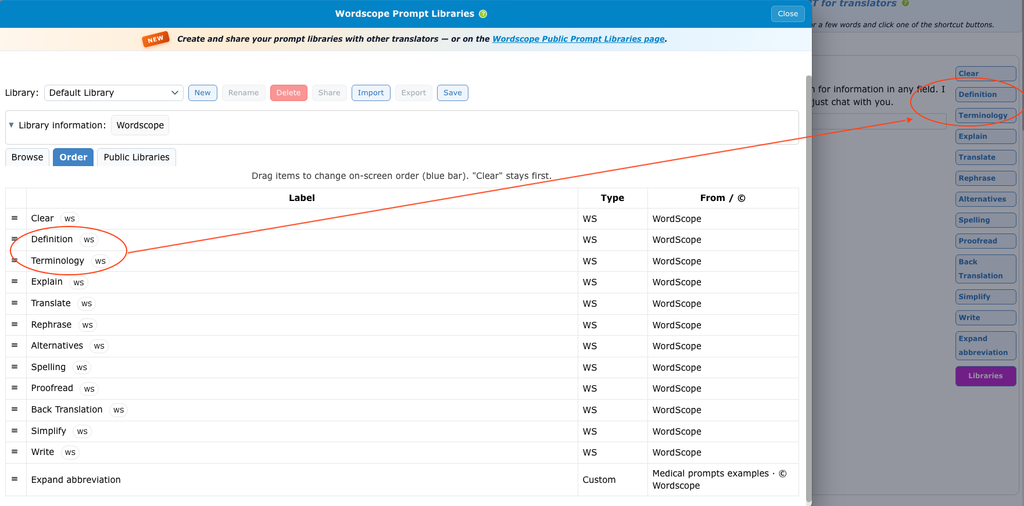
The two actions buttons appear now at the top of the list
The Order tab lists every prompt that has Action ticked, from any library. For this example we only reorder Default Library buttons. If you also activated prompts from example libraries, they appear in the same list and you can drag them too.
To choose which prompts appear as buttons (including prompts from example libraries), see Customize action buttons.
Wordscope is an all-in-one CAT tool, working seamlessly on both Mac and PC, that combines multiple machine translation engines, over a dozen specialized terminology tools, and the robust assistance of ChatGPT for Translators. It provides professional translators with advanced functionalities for translation, definition, rewriting, and much more.
Try now! Log in or sign up to receive a free trial subscription!
Visit pro.wordscope.comTrusted by thousands of professional translators in 40+ countries
Visit pro.wordscope.com to create a translation project.