
Rename library
You can rename a library you own when the current name is unclear, or when the pack has a temporary name after an import (for example you want Client ACME – medical instead of a generic title).
Only the owner can rename a library. You cannot rename the Default Library or a Wordscope-owned pack that is locked.
To rename a library:
1️⃣ Open a project.
2️⃣ Click the ChatGPT button.
3️⃣ Click the Libraries button.
4️⃣ Select the library you want to rename.
5️⃣ Click Rename on the Libraries toolbar.
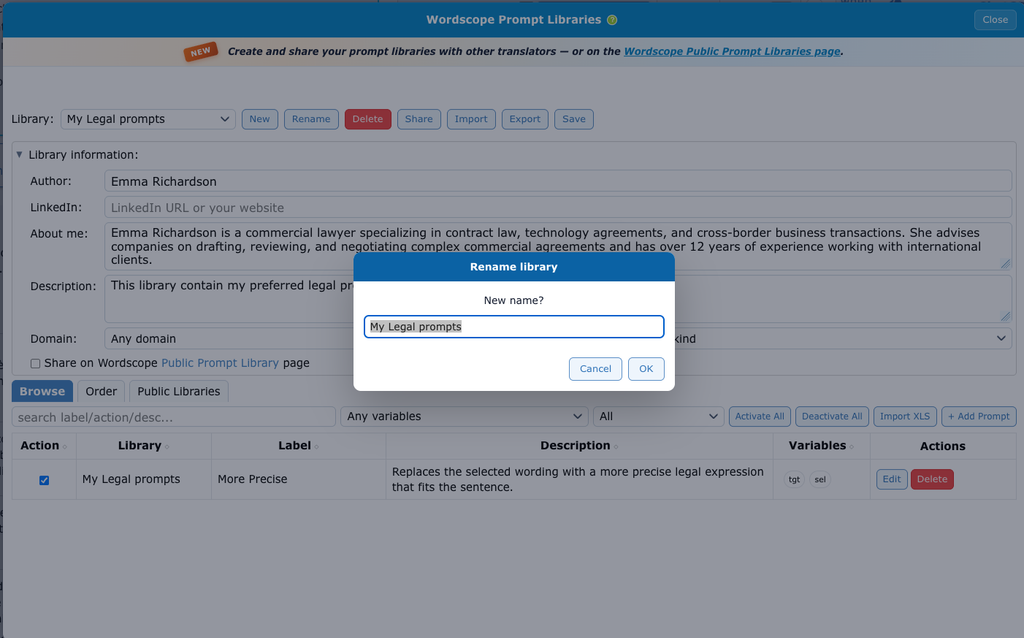
6️⃣ Type the new name in the dialog.
7️⃣ Confirm. The new name appears in the Library: list.
If you see a message that only the owner can rename this library, you are looking at Default Library, a locked Wordscope pack, or a library you did not create. Create a copy (for example by export and import) if you need your own name.
See also Create a library and Delete a library.
Wordscope is an all-in-one CAT tool, working seamlessly on both Mac and PC, that combines multiple machine translation engines, over a dozen specialized terminology tools, and the robust assistance of ChatGPT for Translators. It provides professional translators with advanced functionalities for translation, definition, rewriting, and much more.
Try now! Log in or sign up to receive a free trial subscription!
Visit pro.wordscope.comTrusted by thousands of professional translators in 40+ countries
Visit pro.wordscope.com to create a translation project.