
Deleting a Translation Memory
Ce contenu n’est pas encore disponible dans votre langue.
If you no longer need a Translation Memory (TM), you can permanently remove it from Wordscope in just a few steps.
Steps to delete a Translation Memory
1️⃣ Open Settings
2️⃣ Locate the Translation Memory you want to delete
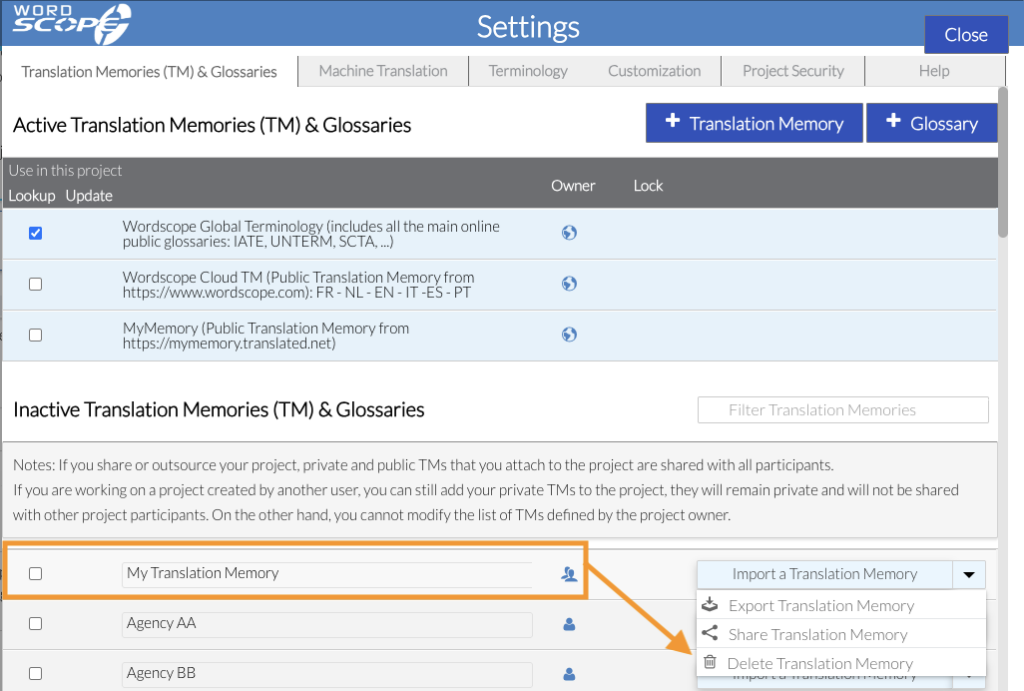
3️⃣ Click the menu on the same line and select Delete Translation Memory
4️⃣ Click Confirm

⚠️ Warning
Deleting a Translation Memory is permanent and cannot be undone. Make sure you no longer need it before proceeding.
If you want to keep a copy, you can export the Translation Memory beforehand by selecting Export Translation Memory from the same menu. This will save a TMX file to your computer for future use or backup.
Wordscope est un outil de TAO tout-en-un, disponible sur Mac et PC, qui combine plusieurs moteurs de traduction automatique, différentes bases de données terminologiques et l'assistance de ChatGPT. Il offre aux traducteurs professionnels des fonctionnalités avancées pour la traduction, la définition, la réécriture et bien plus encore.
Essayez-le maintenant ! Connectez-vous ou inscrivez-vous pour recevoir un abonnement Bronze gratuit !
Visit pro.wordscope.com to create a translation project.